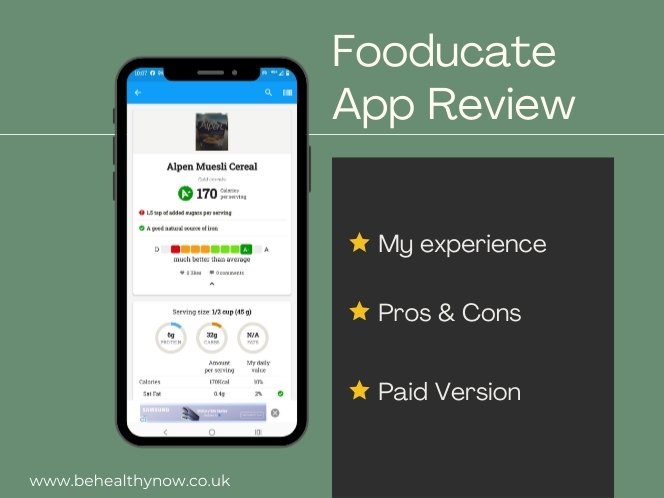
I decided to test Fooducate because it often comes up when searching for food scanning and calorie tracking apps. It has over 1 million downloads and many loyal users, so I wanted to see whether it’s actually helpful or just another app giving simplified food scores.
As someone who regularly analyses food labels, I was especially curious about its grading system. Can you rely on those A to D ratings? Do they really reflect how healthy a food is?
I downloaded the free version and properly explored it. I logged meals, scanned products, tested the tracker, checked the community section, looked at premium features, and read through plenty of user reviews.
Here’s what I found.
My First Impressions
It’s not very intuitive.
The screen feels cluttered and it takes time to figure out where things are. Some features are hidden behind icons that aren’t obvious, so you really have to explore the app properly to understand how it works.
It doesn’t feel as clean or modern as some other tracking apps I’ve used. The layout feels messy and moving between sections isn’t always straightforward.
Very quickly I also noticed it’s clearly designed with a US audience in mind. That isn’t made obvious when you first download it.
As someone based in Europe, that matters. For example, there’s no option to use cm and kg as default measurements in some areas, and water tracking is shown in cups rather than ml.
And honestly, in my opinion, it needs a complete revamp.
Now let’s go through everything properly.
What Does Fooducate Actually Do?
Before getting into the details, here’s what Fooducate is designed to offer:
Free version includes:
- Calorie tracking
- Macro tracking (carbs, protein, fat)
- Sugar and added sugar breakdown
- Water tracking
- Weight tracking with progress chart
- Food scanner with A–D grading system
- Access to community discussions
- Ability to save meals for easier tracking
You can add entries by tapping the plus button at the bottom. From there you can choose:
- Food
- Burn (exercise)
- Water
- Weight
- Measurements
Exercise tracking is available, but it’s not clearly labelled in the main interface. There’s only a small running icon next to the Calories section, which isn’t clickable. I only realised proper exercise tracking existed after exploring the plus button and selecting “Burn,” where you’re given a list of exercises to log.
Now, some features are locked behind the premium version.
Premium features include:
- Carb breakdown (good vs bad carbs)
- Detailed fat analysis (total vs saturated)
- Tracking additional nutrients
- Diet preferences (keto, low-carb, vegetarian, vegan, etc.)
- Health condition filters (heart health, diabetes, cholesterol support)
- Ability to plan ahead
On paper, that’s quite a lot.
Now let’s look at how well it actually works in practice.
The Free Version: Constant Upgrade Prompts
Let’s talk about the free version.
Because this is where things start to get frustrating.
Very often, when I tapped on a feature or tried to move to another screen, I was taken straight to a subscription page. Not occasionally. Regularly.
It feels intrusive.
Instead of naturally exploring the app, you’re repeatedly interrupted with upgrade prompts. Even closing certain ads at the bottom of the screen sometimes redirects you to a subscription offer.
That breaks the flow completely.
Another limitation is that you can’t plan ahead unless you pay. If you want to log food for the next day to give yourself a head start, that’s locked behind the premium version.
So while the app is technically free, the experience constantly reminds you that you’re not using the paid version.
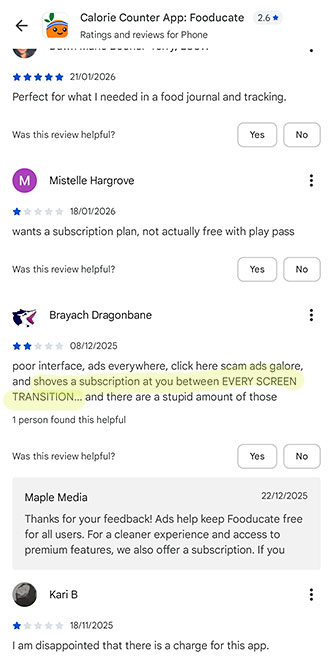
And judging by user reviews, I’m not the only one who noticed this. One person described it as:
Shoves a subscription at you between every screen transition.
That sums it up quite well.
If you’re someone who doesn’t mind upgrade prompts, this might not bother you. But if you want a smooth, uninterrupted tracking experience, it can quickly become irritating.
The Tracker: Good Idea, But Clunky
At its core, Fooducate is a calorie and food tracking app. And once you understand where everything is, it does allow you to track quite a lot.
The idea is good. The execution just feels a bit clunky.
Adding Food
To log food, you tap the plus button at the bottom of the screen and select “Food.”
That part is straightforward once you know where to look. But it’s not immediately obvious when you first start using the app.
After adding something, the app tells you it’s been logged. But it doesn’t automatically take you back to your daily tracking screen. You stay on the same page, which can be confusing. I often had to manually switch back to the tracker to check whether my food was actually added.
Navigation between sections isn’t always smooth, and that breaks the flow a little.
Editing Entries
This is one of the bigger frustrations.
If you enter the wrong serving size or make a small mistake, you cannot simply edit the entry.
You have to delete the entire food item and add it again from scratch.
That may not sound like a big deal, but when you’re tracking daily, it quickly becomes annoying. Especially if you forget to adjust the portion properly the first time.
Daily Summary
Now for the positive side.
The daily summary section is actually useful.
You get:
- Total calories
- Macros (carbs, protein, fat)
- Total sugar and added sugar
- Water tracking
- Weight tracking
I particularly like that it separates total sugar from added sugar. That gives you a clearer picture of what you’re consuming and whether you’re staying within reasonable limits.
You can also log your weight and see it change over time in the “My Progress” chart, which is helpful if your goal is weight loss.
Once you’ve used the app for a few days and saved meals, tracking does become easier. You can see your history and reuse entries, which makes the process quicker.
So while the interface feels messy at times, the tracking features themselves are not bad.
They just need better design and smoother navigation.
Food Grades: How Reliable Are They?
One of Fooducate’s main selling points is its grading system.
Scan a product or search it in the database, and you’ll get a grade from A to D. At first glance, this sounds helpful. Quick answer. Simple decision.
But the more I explored the ratings, the more questions I had.
Let’s look at a few examples.
Alpen Muesli (With Added Sugar vs No Added Sugar)
I searched for Alpen Muesli, which I occasionally eat.
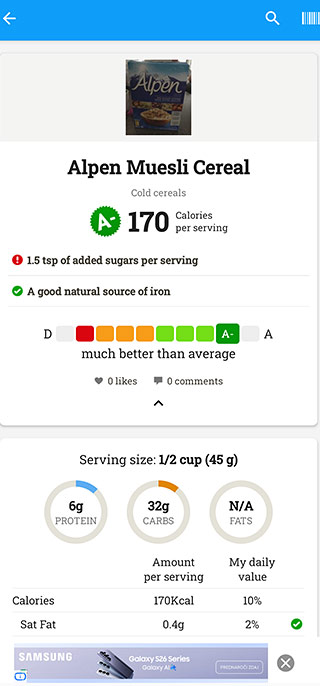
The version with added sugar received an A- rating.
Underneath the product name, I could see:
- 170 calories per serving
- A red exclamation mark showing 1.5g of added sugar per serving
- Recommended serving size: 45g
Now here’s where things get interesting.
Many people don’t eat 45g of cereal. Realistically, a bowl is often closer to 60g. That automatically increases the added sugar.
Yet despite containing added sugar, the product still received an A-.
When I checked the nutritional breakdown:
- Fibre had a green tick, which is good.
- Protein was 6g per serving, but there was no indication whether that’s considered good.
- There’s no option to view values per 100g, only per serving.
The “My Daily Value” column showed 20% fibre based on US guidelines. In the UK, recommended fibre intake is 30g per day, not 25g as often referenced in US standards. So even the context behind those percentages depends on where you live.
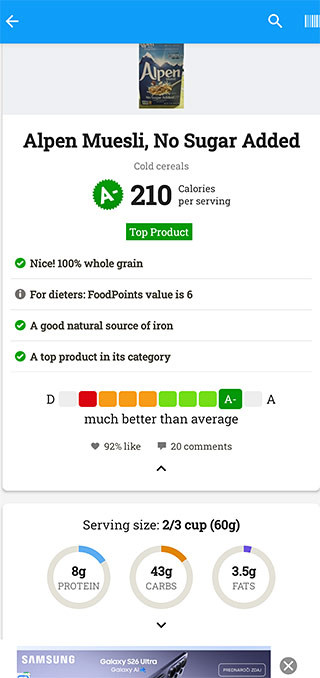
Then I looked at Alpen Muesli No Added Sugar.
It also received an A-.
This version had:
- No added sugar
- A 60g serving size
- Natural sugars from raisins mostly
Same grade.
That’s where the grading system starts to feel questionable.
A product with added sugar and one without added sugar receiving the same rating does not help consumers make a better choice.
This is where portion size really matters. Grades oversimplify something that requires context.
Feta Cheese
Next, I searched for feta cheese.
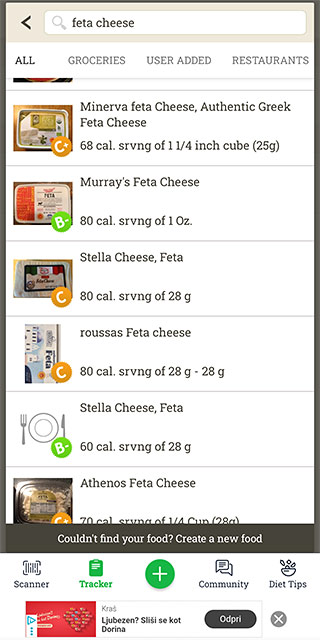
Different brands had different ratings. That surprised me at first.
When I looked closer, I noticed that in some cases, products with smaller serving sizes received better grades. Since feta is naturally salty, a smaller portion means less sodium per serving, which can improve the score.
However, that wasn’t consistent across all brands. Some had different ratings even when the serving size looked similar. It’s possible certain brands contained slightly less salt, but in a few cases I couldn’t even explore further. When I tapped on some entries, there was no detailed information available, just an option to add the product to my day.
That makes it harder to understand what the grade is actually based on.
But that doesn’t mean feta is unhealthy.
Feta is a traditional cheese. It’s naturally salty, yes, but a small portion added to a salad can absolutely fit into a balanced diet. The rating alone doesn’t tell you how much you’re realistically going to eat or how it fits into your overall meal.
And personally, I would not let this app dictate my food choices.
Tuna (Rio Mare)
Out of curiosity, I checked Rio Mare tuna in olive oil.
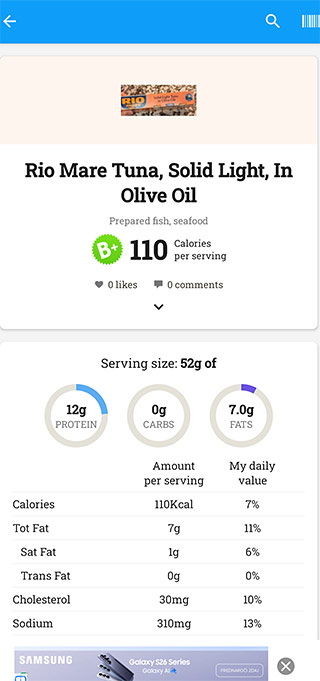
It received a B+.
That felt fairly reasonable. The ingredients are simple: tuna, olive oil, salt.
But when I tapped on “Healthier Alternatives,” I saw canned tuna in water listed alongside some tuna in olive oil options.
It seems lower fat products may score slightly better. But again, context matters. Tuna in olive oil can easily fit into a healthy meal.
The grade alone doesn’t determine whether something belongs in your diet.
Smoked Salmon
Smoked salmon received a B rating.

The ingredients listed keta salmon, brown sugar, natural wood smoke.
Yet the nutrition label showed zero sugar and zero added sugar.
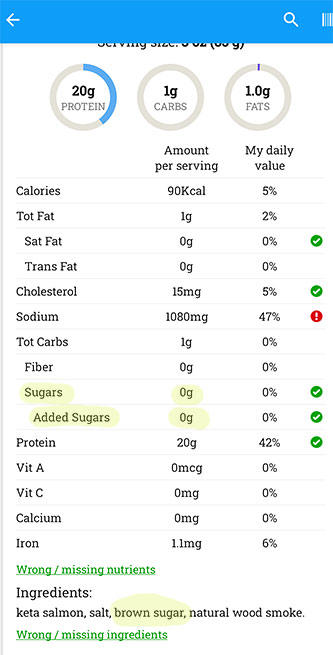
Most likely, the amount of sugar is so small it’s rounded down to zero. But this example highlights something important.
You cannot rely purely on the grade. You still need to understand labels and context.
The Bigger Picture
Fooducate’s grades can give you a rough overview. You’ll see green ticks, red warnings, and highlighted nutrients.
That can be helpful as a starting point.
But food is not black and white. Portion size, overall diet, frequency of consumption, and individual needs all matter.
If someone is looking for a simple answer to “Is this good or bad?”, they might like this system.
But in my experience, it doesn’t give you the full picture.
And that’s the problem.
Is the Food Scanner Reliable?
The food scanner sounds like one of the app’s biggest features.
Scan a product, get a grade, see a breakdown. Simple.
In reality, it’s a bit inconsistent.
Because the app is mainly built around US products, many European items simply don’t appear in the database. When I scanned products from my local shops, quite a few didn’t come up at all.
Even when something does appear, not every entry is complete. Some user-added products don’t have a score. Some are missing ingredient lists. In a few cases, the information didn’t fully match what was printed on the packaging.
If you’re based in Europe and mainly want a scanning app, you’re probably better off using Yuka instead.
The Community: Probably the Strongest Part of the App
If there’s one area where Fooducate really stands out, it’s the community.
There’s an active discussion section where users ask questions, share progress, post photos, and give each other advice. You can comment, reply, and even “like” posts.
It feels engaged.
People share tips not just about food, but also about how to use the app more effectively. If you’re stuck, chances are someone else has asked the same question.
That kind of peer support can be motivating, especially if you’re trying to lose weight or change your eating habits.
It makes the app feel more interactive rather than just a tracking tool.
The only small frustration I noticed is that the heart button to like comments is tiny and sometimes takes a few tries to register. Not a major issue, but noticeable.
Overall, the community feature is probably Fooducate’s biggest strength.
Is Fooducate Premium Worth It?
Fooducate does offer more detailed tracking if you upgrade. You can analyse carbs and fats in more depth, track additional nutrients, follow specific diets, and set health-related goals.
The features themselves are not bad.
The real question is whether they justify paying for the app.
If you’re someone who wants detailed nutrient analysis and follows a specific eating style like keto or low-carb, you might find value in it.
But if you mainly want:
- Basic calorie tracking
- A rough macro overview
- Occasional product scanning
The free version already covers most of that.
For me personally, the issue isn’t that premium exists. It’s how aggressively the free version pushes you toward it.
And when the interface already feels cluttered and inconsistent, paying for more features doesn’t automatically fix the underlying usability issues.
Fooducate Pros and Cons at a Glance
Here’s a quick summary of what works well and what doesn’t.
Pros
- Active and supportive community
- Tracks calories, macros, sugar and added sugar
- Weight progress chart
- Ability to save meals
- Premium offers more detailed nutrient tracking
Cons
- Cluttered, outdated interface
- Not very intuitive
- Cannot edit food entries
- Frequent upgrade prompts in free version
- Scanner limited outside the US
- No per 100g nutritional view
- Serving size heavily influences grades
- Food grades can oversimplify context
Final Verdict: Is Fooducate Worth It?
After properly testing Fooducate, I wouldn’t personally recommend it.
That doesn’t mean it’s useless. It does have some solid tracking features and a genuinely strong community.
But overall, the cluttered interface, constant upgrade prompts, inconsistent scanner, and questionable grading system make it hard to fully trust or enjoy using.
There are better options out there.
If your main goal is food scanning, Yuka is easier to use and more reliable outside the US. It’s not perfect either, but it gives you a quick overview in a much cleaner way.
If you’re looking for calorie tracking with smoother navigation, FatSecret is, in my experience, much easier to use. You can track food, weight, and exercise without constantly being pushed to upgrade.
But here’s the bigger point.
No app can replace understanding food labels yourself.
Apps simplify. They summarise. They score.
But food is not black and white. Portion sizes matter. Ingredients matter. Context matters.
If you really care about making better food choices and want clear, practical guidance on how to read labels properly, that’s exactly why I created my Label Decoder guide. It walks you through how to analyse products confidently without relying on oversimplified grades.
Because once you know what to look for, you don’t need an app to tell you whether something is “good” or “bad.”

